NHAPI provides core components for parsing/encoding HL7 messages.In my case I will use NHapi.Model.V231 for parsing.I will be using below message to parse int his blog.
MSH|^~\&|ADL Messaging|ADL|Receiving App|Receiving facility|201907160346||ORU^R01|20190716033149_CM796136|T|2.3.1|||AL|||||
PID|||||SURNAME^FIRSTNAME^^^||189912310000|M|||^^^^|||||||||||||||||||
PV1|||Hsp^Hospital Ltd|||||||||||||||||||||||||||||||||||||||||
ORC|RE|PatientId|0019T637146||CM||||201907160346|||||||||||
OBR|1|CM796136|0019T637146|FBCX^FULL BLOOD COUNT^WinPath||201907151657|201907151030|||||||||^||||||||TDL|F||||||||||||||||||||
NTE|1||Morning hours 6-10am : 166-507 nmol/L..br\Afternoon hours 4-8pm : 73.8-291 nmol/L.
NTE|1||Morning1 hours 6-10am : 166-507 nmol/L..br\Afternoon hours 4-8pm : 73.8-291 nmol/L.
OBX|1|NM|HBGL^HAEMOGLOBIN (g/L)^WinPath^HAEMATOLOGY^1^0||122|g/L|130 - 170|L|||F|||||
NTE|1||Morning hours 6-10am : 166-507 nmol/L..br\Afternoon hours 4-8pm : 73.8-291 nmol/L.
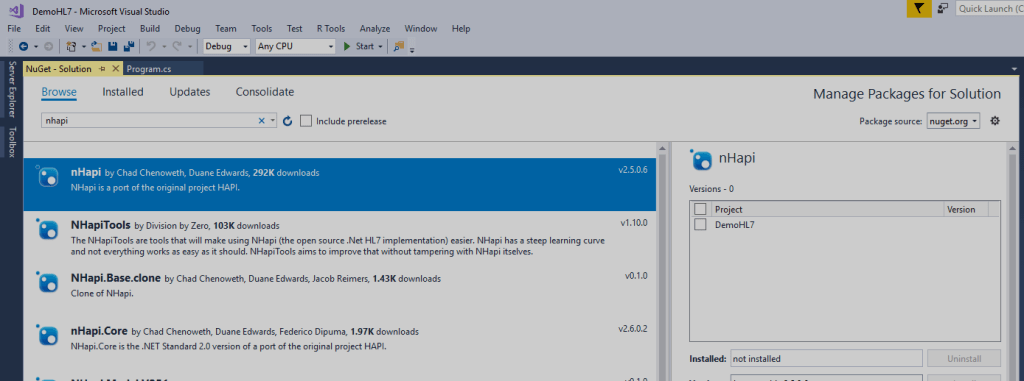
Install the NHAPI in to your project.
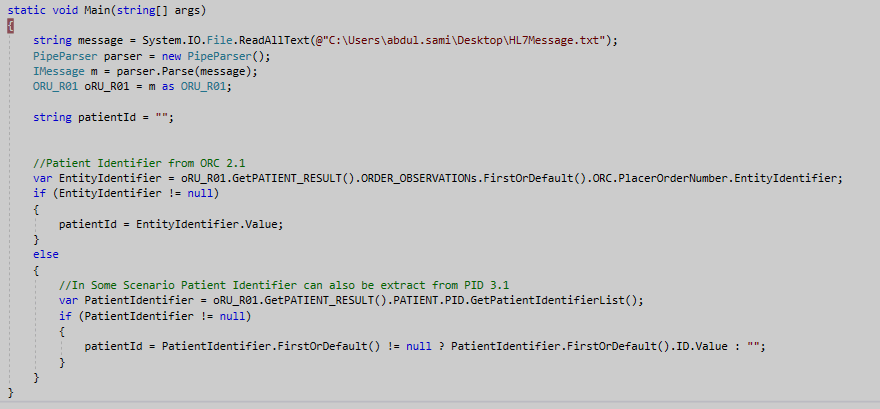
The first thing I have done is I have extract the Identifier from this message, In my scenario I will be extracting it from ORC and PID segment depending up on the vendors I will be receiving the message file.
Birthdate of a patient can be extracted from PID segment like this

Now moving towards the main part we need to extract observation details from this message for this I have crated the two model classes (Patient Order and Patient Order Result) in which I will be storing the Observation details.
Here is the complete code snippet of my project.
using NHapi.Base.Parser;
using NHapi.Model.V231.Message;
using System;
using System.Collections.Generic;
using System.Linq;
using NHapi.Base.Model;
using NHapi.Model.V231.Segment;

namespace DemoHL7
{
    class Program
    {
        static void Main(string[] args)
        {
            string message = System.IO.File.ReadAllText(@"C:\Users\abdul.sami\Desktop\HL7Message.txt");
            PipeParser parser = new PipeParser();
            IMessage m = parser.Parse(message);
            ORU_R01 oRU_R01 = m as ORU_R01;

            string patientId = "";

            //Patient Identifier from ORC 2.1
            var EntityIdentifier = oRU_R01.GetPATIENT_RESULT().ORDER_OBSERVATIONs.FirstOrDefault().ORC.PlacerOrderNumber.EntityIdentifier;
            if (EntityIdentifier != null)
            {
                patientId = EntityIdentifier.Value;
            }
            else
            {
                //In Some Scenario Patient Identifier can also be extract from PID 3.1
                var PatientIdentifier = oRU_R01.GetPATIENT_RESULT().PATIENT.PID.GetPatientIdentifierList();
                if (PatientIdentifier != null)
                {
                    patientId = PatientIdentifier.FirstOrDefault() != null ? PatientIdentifier.FirstOrDefault().ID.Value : "";
                }
            }

            //BirthDate of a Patient can be extract from PID 7.1
            if (oRU_R01.GetPATIENT_RESULT().PATIENT.PID.DateTimeOfBirth.TimeOfAnEvent != null)
            {
                var timeOfAnEvent = oRU_R01.GetPATIENT_RESULT().PATIENT.PID.DateTimeOfBirth.TimeOfAnEvent;
                if (timeOfAnEvent.Year > 0 && timeOfAnEvent.Month > 0 && timeOfAnEvent.Day > 0)
                {

                    DateTime birthDate = new DateTime(timeOfAnEvent.Year, timeOfAnEvent.Month, timeOfAnEvent.Day, timeOfAnEvent.Hour, timeOfAnEvent.Minute, timeOfAnEvent.Second);

                }
            }
            List PatientOrderList = new List();
            foreach (var observation in oRU_R01.PATIENT_RESULTs.FirstOrDefault().ORDER_OBSERVATIONs)
            {
                List PatientOrderResultList = new List();
                PatientOrder PatientOrder = new PatientOrder();

                var OBR_UniversalServiceID = observation.OBR.UniversalServiceID;
                PatientOrder.LabTest = OBR_UniversalServiceID.Identifier != null ? OBR_UniversalServiceID.Identifier.Value : ""; //OBR 4.1
                PatientOrder.LabTestDescription = OBR_UniversalServiceID.Text != null ? OBR_UniversalServiceID.Text.Value : ""; //OBR 4.2
                PatientOrder.ResultStatus = observation.OBR.ResultStatus.Value;  //OBR 25.1
                if (observation.OBR.SpecimenReceivedDateTime.TimeOfAnEvent != null)
                {
                    var timeOfAnEvent = observation.OBR.SpecimenReceivedDateTime.TimeOfAnEvent; //OBR 14.1
                    if (timeOfAnEvent.Year > 0)
                    {
                        DateTime dateTime = new DateTime(timeOfAnEvent.Year, timeOfAnEvent.Month, timeOfAnEvent.Day, timeOfAnEvent.Hour, timeOfAnEvent.Minute, timeOfAnEvent.Second);
                        PatientOrder.SpecimenDateTime = dateTime;
                    }
                }
                if (observation.NTEs.Count() > 0)
                {
                    PatientOrder.Comments = GenerateNTEComments(observation.NTEs.ToList());  //Comments of OBR Segment currently I'm storing these(multiple) comments in single line(come seprated)
                }
                foreach (var observationDetail in observation.OBSERVATIONs)
                {
                    PatientOrderResult PatientOrderResult = new PatientOrderResult();
                    Varies result = observationDetail.OBX.GetObservationValue(0); //Observation Result
                    if (observationDetail.NTEs.Count() > 0)
                    {
                        PatientOrderResult.Comments = GenerateNTEComments(observationDetail.NTEs.ToList()); //Comments of OBX Segment currently I'm storing these(multiple) comments in single line(come seprated)
                    }
                    PatientOrderResult.Code = observationDetail.OBX.ObservationIdentifier.Identifier.Value; //Result Code OBX 3.1
                    PatientOrderResult.Description = observationDetail.OBX.ObservationIdentifier.Text.Value; //Result Code Description  OBX 3.2
                    PatientOrderResult.Result = result.Data.ToString();    // Result of a test OBX 5.1
                    PatientOrderResult.Unit = observationDetail.OBX.Units.Identifier != null ? observationDetail.OBX.Units.Identifier.Value : ""; //Unit OBX 6.1
                    PatientOrderResult.Ranges = observationDetail.OBX.ReferencesRange.Value; // OBX 7.1
                    PatientOrderResult.AbnormalFlag = observationDetail.OBX.GetAbnormalFlags(0).Value; // OBX 8.1
                    PatientOrderResult.ObservationResultStatus = observationDetail.OBX.ObservationResultStatus.Value;  //Observation Result Status OBX 11.1

                    PatientOrderResultList.Add(PatientOrderResult);
                }
                PatientOrder.PatientOrderResultList = PatientOrderResultList;
                PatientOrderList.Add(PatientOrder);

            }


        }
        public static string GenerateNTEComments(List nte)
        {
            string nteComment = "";
            try
            {
                for (int i = 0; i <= nte.Count() - 1; i++)
                {
                    if (nte[i].GetComment() != null && nte[i].GetComment().FirstOrDefault() != null && nte[i].GetComment().FirstOrDefault().Value != null)
                    {
                        if (nteComment != "")
                        {
                            nteComment += ", ";

                        }
                        nteComment += nte[i].GetComment().FirstOrDefault().Value;
                    }
                }
            }
            catch (Exception ex)
            {

            }
            return nteComment;
        }
    }

    public class PatientOrder
    {

        public string LabTest { get; set; }
        public string LabTestDescription { get; set; }
        public string ResultStatus { get; set; }
        public string Comments { get; set; }
        public DateTime? SpecimenDateTime { get; set; }
        public List PatientOrderResultList { get; set; }
    }
    public class PatientOrderResult
    {

        public string Code { get; set; }
        public string Description { get; set; }
        public string Result { get; set; }
        public string Unit { get; set; }
        public string Comments { get; set; }
        public string Ranges { get; set; }
        public string AbnormalFlag { get; set; }
        public string ObservationResultStatus { get; set; }
    }
}
Summary
In this blog I have tried to explain the parsing of HL7 message and highlighted the important fields in this message.
 MS Dynamics 365 CE, Power Platform, Azure & Dot Net Technologies